If you open the camera roll on your phone right this second, what are the odds you have roughly four thousand photos you love, yet not a single one displayed anywhere in your actual home?
Between snaps of our daughters pulling ridiculous faces, holidays, milestones, and quiet moments that deserve better than digital obscurity, our cloud storage has quietly turned into digital graveyard. We capture everything and then essentially do nothing with it.
Enter the Cricut StickerPix Print + Cut.
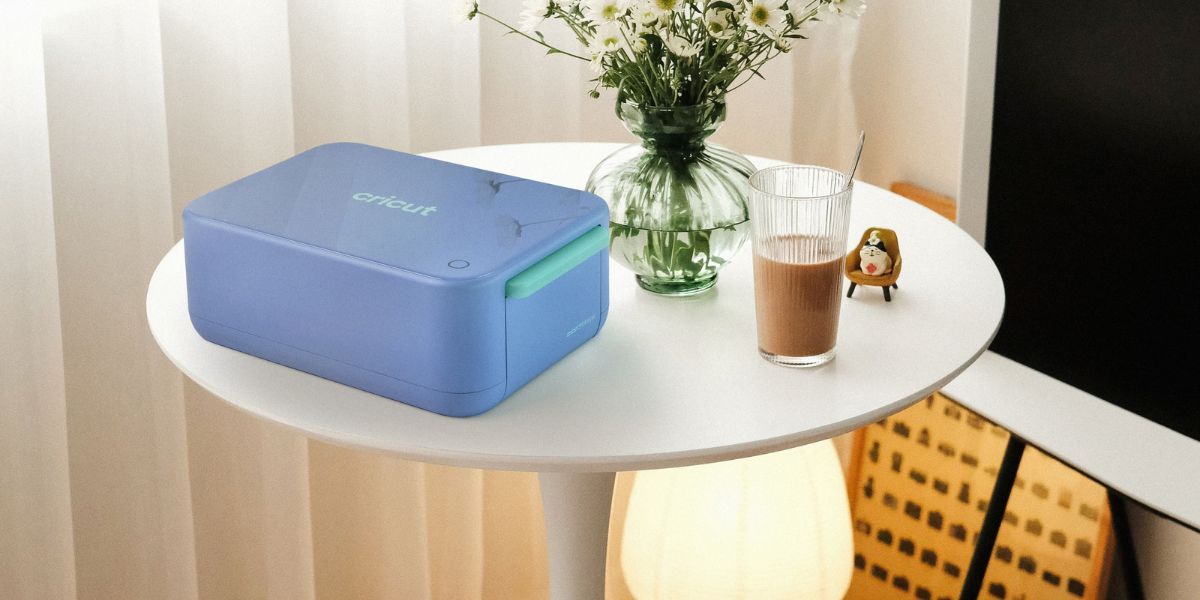
Cricut is venturing into entirely new territory with a compact lifestyle machine that takes a photo straight from your phone, prints it with vivid colours, laminates it so it survives daily life, and precision-cuts custom shapes with a built-in blade. We tested the machine to see if it would live up to it’s promise of kitchen table creativity, and it has quickly shown that it is more than meets the eye and perfect for weekend projects with the kids.

Why Does the StickerPix Exist?
To understand why this machine feels so refreshing, you have to look at what sticker making used to look like.
Traditionally, if you wanted custom die-cut stickers at home, you needed a multi-piece assembly line: a standard inkjet printer, specialized sticker paper, clear self-adhesive laminate sheets to stop the ink from running, and a dedicated smart cutter like a Cricut Joy or Cricut Maker. You had to register cut marks, hope the sensor did not get confused by room lighting, and smooth down air bubbles by hand. It was rewarding, sure, but it was certainly not an impromptu ten-minute activity before school.
At the same time, these three cultural events collided:
Photo Overflow: We hold thousands of precious memories on our devices and in clouds that rarely make it beyond a screen.
The Sticker Craze: Stickers have become a primary visual language for personal expression, decorating drink bottles, laptops, school notebooks, and tech accessories. It seems like stickers are more popular now then they have ever been and the ability to custom create your own is mindblowing.
Everyday Digital Creativity: Simple editing apps and generative image tools have made styling, filtering, and remixing photos effortless. As someone who is on the fence when it comes to AI, I can totally see the benifits when used in a creative space like this.
Cricut designed the StickerPix line to capture that exact intersection. It exists to remove the friction entirely, serving as an approachable gateway into creative crafting without demanding an entire studio workshop to get started.
How It Actually Works
Setting up the StickerPix Print + Cut on a desk or kitchen bench is refreshingly simple. There are no bulky power bricks or confusing cable bundles and it connects seamlessly via Bluetooth to the Cricut Design Space mobile and desktop applications for both IOS and Android. I used the system on both platforms and found it to be equally as intuitive. In fact it holds your hand through the entire print process with step by step instructions to make sure each print turns out perfect.
That perfection happens in three distinct phases inside a single tidy stylish shell:

1. Thermal Dye-Sublimation Printing
Instead of messy liquid ink cartridges that clog after two weeks of inactivity, the StickerPix uses thermal dye-sublimation. Heat activates colour ribbons to transfer rich, continuous-tone colour onto the paper. The colours appear vivid and crisp, avoiding the muddy pixelation often seen in budget photo printers.
2. Built-in Lamination
Immediately after laying down the colour, the internal mechanism applies a durable, clear protective overlay. The finished print leaves the machine completely dry to the touch, no waiting around for ink to set.
3. Precision Contour Cutting
This is where the “Print + Cut” model earns its keep over standard photo printers. An integrated fine-point blade traces the outline of your design, cutting cleanly around your subject to produce a ready-to-peel custom sticker.
The entire process boils down to one simple command: pick an image in the app, choose your cut border, hit send, and watch it roll out ready to stick. Quick warning though, the final stage is actually the cut when making stickers. You think the machine is done, but then it sucks the paper back in and perfoms the cut, so don’t take the paper at the wrong point or you’ll be manually cutting those stickers out with scissors like we did on our first go.
What It Does Exceptionally Well
The standout here is the simplicity. It takes all the tedious, multi-step procedures of a full-sized Cricut Maker setup and boils them down into a single, straightforward action. For busy households, that convenience is worth its weight in gold.
Creating stickers with our daughters quickly became an addictive ritual. We spent hours in the app applying fun artistic filters, testing out creative themes, and turning candid family photos into custom stickers. The new puppy gets lots of attention in the app with our designs. What I like the most is that the AI driven interface is intuitive enough that children can see their ideas come to life almost immediately. We’ve made sticker for multiple uses already, school projects, personalised lunchboxes, and even reward charts. Making adjustments along the way was easy as well, I intially had some great images of the girls that I wanted to use as lables so I just added a command to tell it to lable them with their names and the style I’d like and the next minute we were printing personalised labels for drink bottles, lunch packs and backpacks.
These are not flimsy paper stickers that disintegrate the moment they encounter something wet either. Thanks to that built-in protective layer, our prints have survived dishwasher cycles on water bottles, everyday scuffs on backpacks, and rough treatment on lunch containers without peeling, smudging, or fading.
It’s also quite small, taking up very little bench real estate, looking more like a modern smart speaker or sleek lifestyle accessory with its bubble look rather than a piece of commercial printing hardware. Mine actually got upgraded from the kitchen bench to the studio workbench we were using it so much. It sits with pride between the 3D printer and the Maker 5.
By fusing printing, protective coating, and fine-point cutting into one housing, the StickerPix carves out an attractive niche for users who found traditional cutting plotters far too intimidating.
What I don’t Love
You are locked into Cricut’s specialised cartridge and paper packs. You cannot slide in random sheets of gloss paper or budget vinyl from an office supply store. When your ribbon runs out, you will need to restock with official refills and at $85 Aussie Dollarbucks a pop you are going to need to really keep an eye on excessive machine use. Keep asking the kids “are you really sure you want to print this one” or that sticker bill is going to blow out.
This machine is built for personal expression, family memories, and small creative bursts. If you run a small business and need to print and cut three hundred bumper stickers for an event, the per-sheet timing and consumer-oriented paper sizes will quickly feel restrictive.

Pricing and Practical Value
The StickerPix range arrives in two distinct hardware configurations:
- Cricut StickerPix Print + Cut Bundle: AUD $469 / NZD $579 (Includes the machine, 18 sticker sheets, 18 photo paper sheets, and 1 ink cartridge).
- Refill Sticker Sets: AUD $84.95 / NZD $109.95 for 72 sheets and 2 cartridges.
- Refill Photo Paper Sets: AUD $69.95 / NZD $89.95 for 72 sheets and 2 cartridges.
- Cricut StickerPix Print Bundle: AUD $289 / NZD $349 (Includes the machine, 18 precut rectangle sheets, 18 precut circle sheets, 18 photo paper sheets, and 1 ink cartridge).
The entry price of the machine is actually reasonable, the true value lies in how frequently you use it. Rather than buying a complicated cutting plotter that ends up stashed away in a craft cupboard, the StickerPix earns its keep on the bench because it actually gets used.
Final Verdict: Is It Recommended?
The Cricut StickerPix Print + Cut hits a sweet spot that home technology often misses. It manages to be a fantastic gateway into the wider universe of Cricut crafting while standing tall as a complete, self-contained creative station in its own right.
By taking the intimidating, multi-phase steps of a full-scale cutter and condensing them into a single tap on your smartphone, it transforms your camera roll into vibrant, waterproof keepsakes that children and adults alike can enjoy immediately.
While ongoing cartridge costs mean you will not use it for commercial production runs, its sheer ease of use, family-friendly charm, and outstanding print quality make it a standout addition to any creative household.
I Highly Recommended the Cricut StickerPix Print + Cut for busy families, photo lovers, and everyday hobbyists who want physical memories without the traditional crafting headache. Who know’s some time with this little beauty could act like a gatway into an obsession with crafting machines and you’ll eventually upgrade to a Cricut Maker 5.
Cricut StickerPix Print + Cut and Cricut StickerPix Print will be available beginning 15th October 2026 at leading retailers; Spotlight and Harvey Norman in Australia and New Zealand